

HOW TO CREATE A CONTENT PLAN FOR INSTAGRAM?
-
Post author

-


Content planning for social media is the process where a business owner, social media manager, or marketer decides what kind of content should be posted to promote a brand, when it should be posted, and where it should be published.
An effective content plan, also known as a content calendar, helps set brand promotion priorities on Instagram, organize the content creation process, and improve it based on performance analytics.
What Is It About?
- What is a content plan and why is it important?
- Steps for creating a content plan
- Where to find content ideas for Instagram?
- Conclusion
What is a Content Plan and Why is it Important?
Before starting to promote a company or personal brand on Instagram, you need to develop a content strategy and a content plan. The strategy includes setting goals, describing your target audience in detail, identifying the most effective promotion channels, and choosing the best post formats. The content plan, on the other hand, is a written document used to carry out the approved strategy.
A content strategy can include the number and type of posts. It also involves planning collaborations with influencers or other stores, scheduling business promotion events (such as trade shows, product photo shoots, video production, purchasing props for shoots, or searching for locations). In many cases, the strategy includes budgeting for advertising.
The content plan is shorter but more specific. It’s usually a table that shows a detailed schedule of already prepared posts. It includes promotional posts to attract new followers and regular ones aimed at engaging the audience and building brand loyalty.
The strategy sets the direction for the content plan. To build a strategy, you need to define your promotion goals on Instagram. For example:
- Increase reach by 50%
- Increase comments by 25%
- Gain 100 new followers
The content plan aligns the work on content with your marketing team’s overall strategy. Of course, planning is also helpful for a personal blog. But when promoting a business, a posting calendar is absolutely necessary.
“According to Sprout Social, a leading social media software company, 90% of Instagram users follow a business on Instagram. This makes it a great platform for increasing your brand awareness.”—“How To Create A Content Strategy For Your Instagram Feed,” Stephanie Burns, Former Forbes Contributor
Benefits of Planning Instagram Content
- You can avoid last-minute pressure to create posts and prevent burnout or publishing boring, artificial, or copied content from competitors.
- It also becomes much easier to create timely posts related to current events, as you’ll be prepared to publish quickly when needed.
- A posting calendar along with scheduling tools helps improve reach. After analyzing follower activity, you can schedule posts for the days and hours when your audience is most active and likely to comment or buy.
- The content plan helps keep a good balance between promotional, informative, and entertaining content. This helps avoid “ad blindness” in potential customers.
- Having a plan lets you analyze your promotion results and make changes to both the calendar and the strategy if needed. Followers’ behavior will show which topics should be explored more and which are less relevant.
- Overall, content planning on social media helps connect social media activity with marketing goals and combines the efforts of different teams or specialists.
- Planning content for social media helps connect social media activity with marketing goals and coordinate the efforts of different departments or individual specialists.
The content calendar also includes visual content. With the help of a calendar and preparing photos or videos in advance, your page will look original and stylish. You can use special feed preview tools for this.
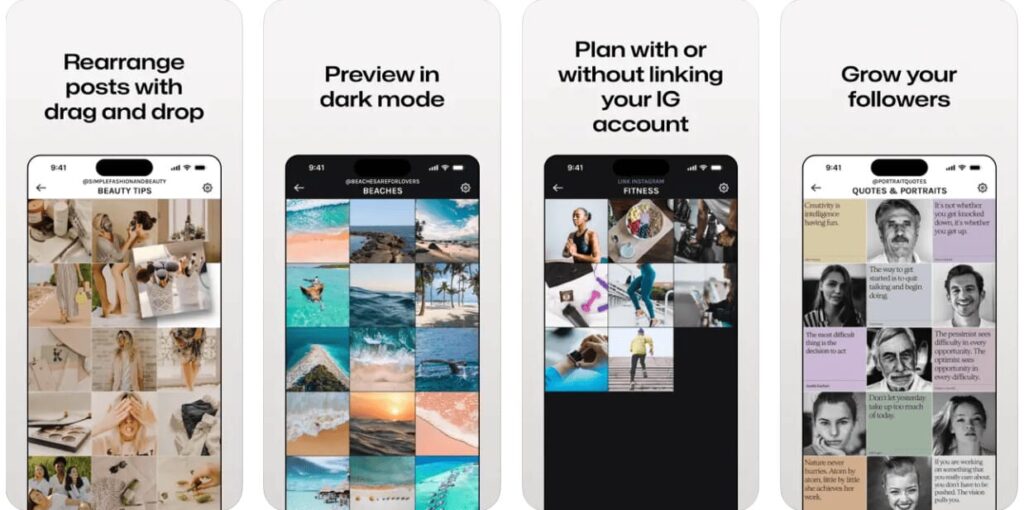
Planning posts, Stories, and Reels on Instagram helps improve the main metrics of business promotion on social media. A clear strategy and posting schedule let you manage your time and other resources, including creating visual content on time.
A content plan for social media usually includes the same items, regardless of the page’s topic:
- Date.
- Category.
- Format (type of content).
- Post title (topic).
- Description or link to the post text.
- Link to the image or video file.
- Hashtags.
Sometimes the Instagram planning document also includes tagged users, products to tag, etc.
📌Read the article: How to Write Impressive Headlines
Steps to Create a Content Plan
At first glance, it may seem like building a content plan is just making a table with topics and post dates. But in reality, this starts with detailed work like researching the business and the target audience.
Even after preparing a post calendar step by step, the planning approach may need to change. It’s important to adjust it regularly based on followers’ requests and different events. You might need to use a new trending content format or react to a news story by creating an info-ad post.
Let’s look at the main steps for building an Instagram posting plan.
Setting Goals
This can be one big goal (like gaining 1,000 followers in 1 month) or a few smaller ones (increase reach by 20%, get 20 new followers, boost likes by 50%, etc.). Set the key performance indicators (KPIs) you want to track while managing your Instagram page. Break down a big goal into smaller parts to make it easier to achieve. Usually, content promotion goals fall into four types:
- Business goals, such as “increase sales by 50%”
- Marketing goals, like “increase brand awareness” and “attract new followers”
- Communication goals, such as “spread a branded hashtag on Instagram and build a community”
- Media goals, focused on reaching the target audience, working with influencers, etc.
To define your goals, the content manager or SMM specialist should talk to the marketer or business owner. This helps avoid planning conflicts. One company might focus on growing its follower count and spreading content, while another may care more about follower engagement from people who already know the brand.
Target Audience Analysis
If your business has been running for a while, you probably already know your target audience well. Still, when building a promotion strategy for a specific platform, it’s a good idea to review different segments of potential clients who are active users of that platform.
Open Instagram Insights in the app or use Facebook Business Manager. These tools give you analytics on your audience, like age range, gender, and location.
In your Instagram profile under “Insights,” you can track key metrics, including growth in reached accounts.
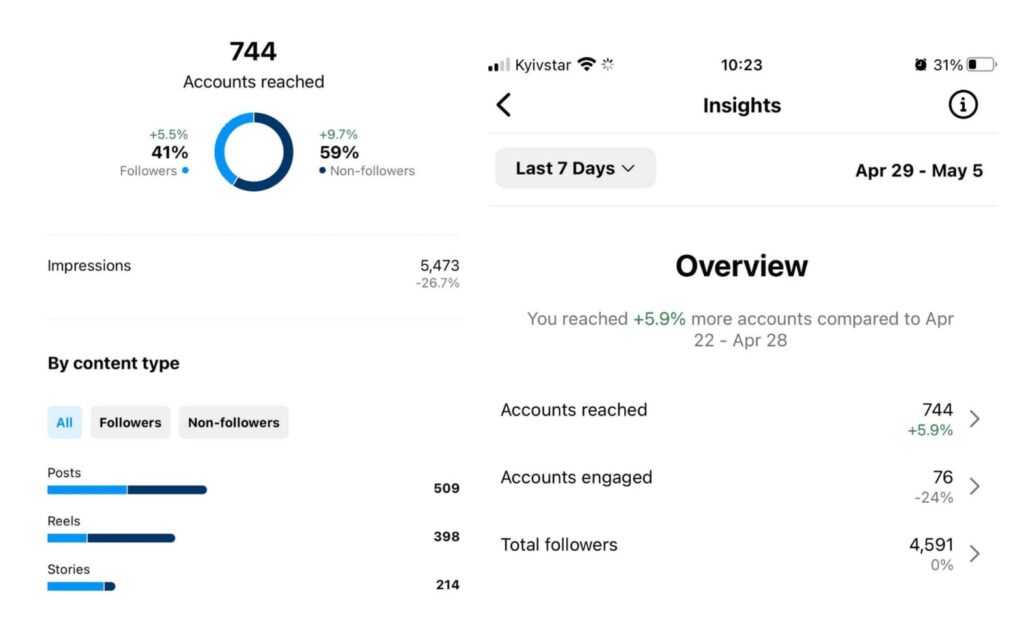
Directly on your Instagram profile, you should learn more about active followers—those who interact with your content the most, place orders now and then, etc.
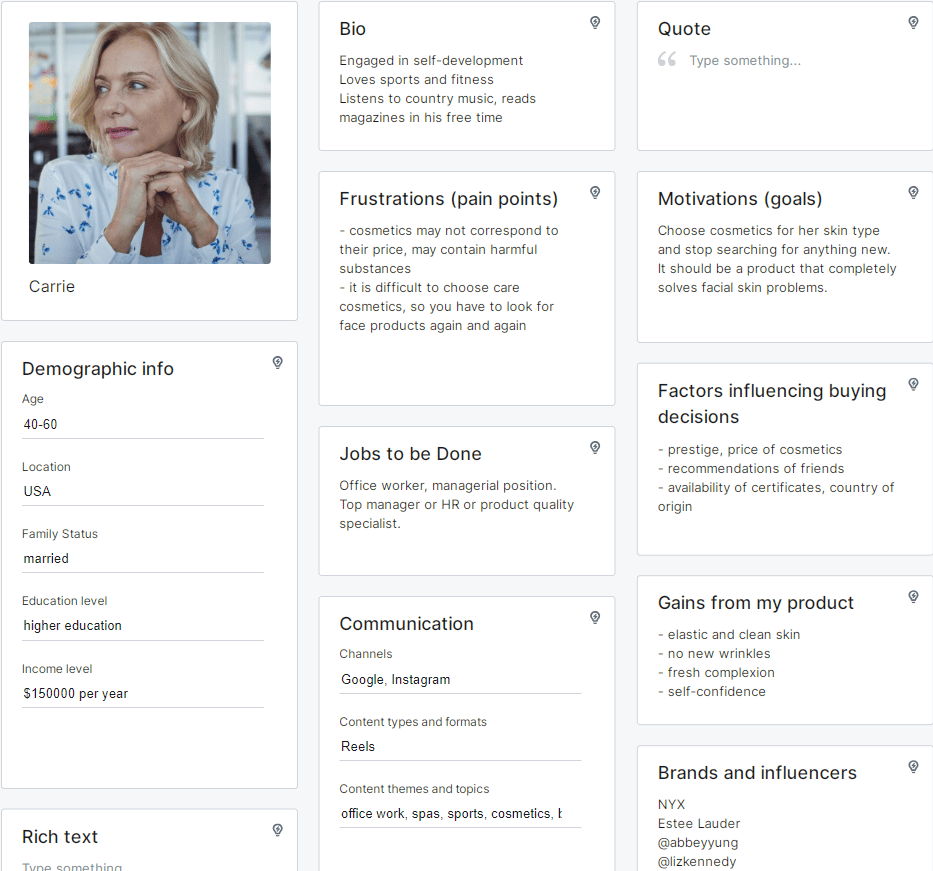
To build a customer persona, you can use a simple Excel table or a special tool like the free Semrush Persona.
Be sure to analyze and write down what kind of content your audience likes, what product-related topics interest them, and what brands and influencers they follow.
Content Matrix Creation
A content matrix is a tool for building a content plan. Usually, it doesn’t include specific topics or detailed information—instead, it has categories and a list of content formats. This kind of table helps you come up with many ideas. Write a list of possible categories vertically, and add several content formats horizontally.
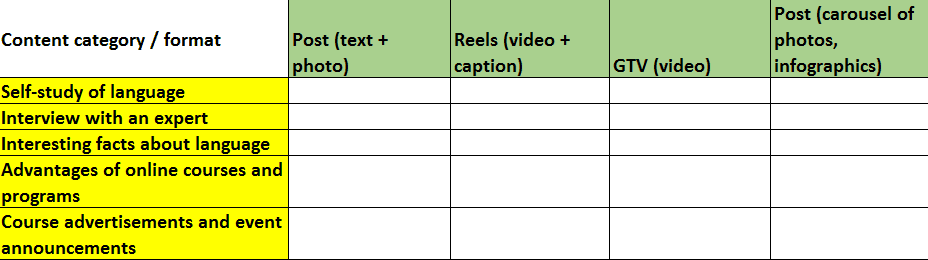
Start with your resources and your audience’s needs—don’t plan 10–15 videos per month if it takes too many resources and your followers enjoy regular posts just as much as Reels.
Aligning Content with Your Marketing Strategy
If there’s an upcoming event related to your business field, use it to create content. For example, if you run a pastry course page, you can post about global price changes for cocoa beans or other ingredients. If you’re in the info business, promote your webinars, introduce the speakers, and slowly guide your audience toward signing up for the online event.
You should also prepare potential buyers for the release of a new product. If your agency is about to launch a new service or your online store is expanding its product range, don’t start with direct ads. First, gently remind your audience of their needs. Share the story behind the new idea, show the product or service in a positive light, and only then move to promotional content.
At this stage, you need to choose topics your target audience will find interesting. More about how to find content ideas for Instagram will be covered in the next part of the article.
📌Read the article: Who is an influencer
Creating a Posting Schedule
Planning posts ahead of time helps avoid stressful situations—like when followers slowly forget your page or even unfollow it, and you don’t have any new text, images, or videos ready. Managing social media is much easier if you stick to a posting schedule.
According to a study by Later, the best time to post on Instagram is early morning, when posts get the most views. But this may vary, so you should analyze your target audience’s daily routine.
You can use Meta Business Suite to schedule posts automatically. Instagram’s built-in analytics shows the best days and times to get the most engagement and views. Of course, you can also do your own research to find the best time and day for posting—audience activity depends on your business type or blog style. Don’t forget to consider upcoming holidays when planning content.
You can automate your content posting with special tools. These include Creator Studio (a free tool from Facebook), Later (supports story scheduling), or Plann (lets you manage hashtags and analyze competitor strategies).
Instagram professional account owners can schedule up to 25 posts per day directly from their settings. The platform allows planning content up to 75 days in advance.
Creating a Content Plan Layout
Canva offers both free and paid content calendar templates.
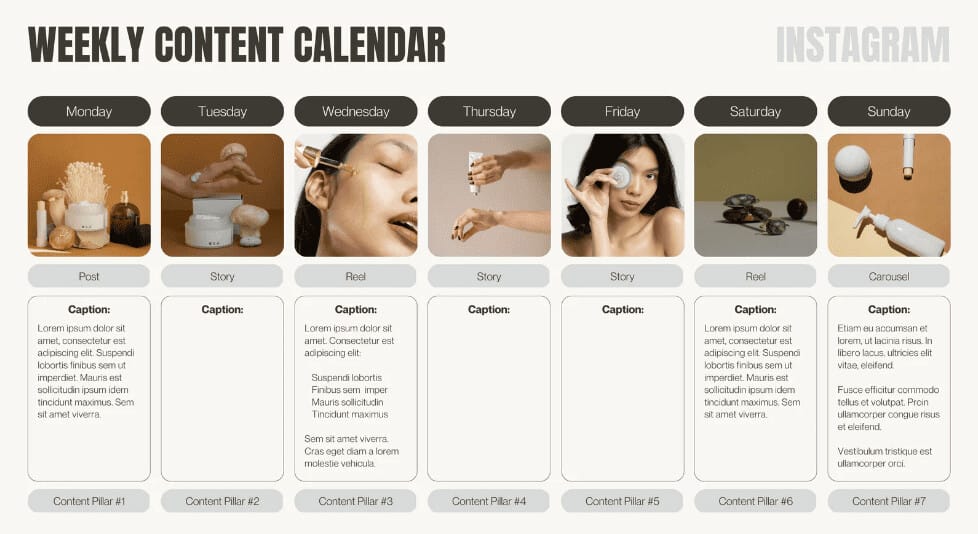
You can print out design-style content calendars and hang them on the wall.

But if you need to include a lot of important info—like links, detailed descriptions, and hashtag lists for copying—go for simpler digital versions. That way, you can easily share a link to the file with a coworker, contractor, or client.
The easiest way to create a content calendar is using an Excel spreadsheet. You can also use MS Word or Google Sheets. The number of columns depends on how clear and long-term your social media goals are.

When creating a content plan, think about how the visuals work together. This matters a lot on Instagram, where users mostly look at photo quality and page style. It’s best to prepare photos and videos during the idea phase or even earlier, so the content manager has plenty of choices when it’s time to post.
You can use titles on plain backgrounds for info or motivational posts, and portraits or product photos for ads or personal posts.
A good example of a strong visual style is the Pandora brand profile. It mixes content formats like product photos with models of different ages and races, cool AI-made videos, holiday ads, and Reels showing off the jewelry.

Pick your color scheme and brand fonts while working on your content strategy. You can try different layout styles by mixing image types in different orders. Over time, you’ll figure out what fits your brand and appeals to your audience best.
Analyzing and Optimizing Your Content Plan
Instagram Insights shows how many views a post got and gives you interaction stats to help you see what content formats work best. You can track likes, shares, comments, and saves.
Where to Get Content Ideas for Instagram
At the start, marketers or social media managers often have lots of plans—but after a month, ideas run out and inspiration fades. So where do you find ideas, and how do you make them fit your business?
- Create behind-the-scenes content that helps followers learn more about your company, team, tech, and more.
- Save customer reviews and ask followers to tag you in their posts. These social proofs build trust. In some business types, you can turn reviews into case studies or “before and after” examples.
- Educational posts and how-to guides are popular in many industries. Look at the questions people ask most when buying or using your product. Then turn those into a series of FAQ posts.
- Let yourself and your followers take a break. That doesn’t mean long pauses between posts—it means making fun content like joke videos or inspiring quotes that match what your audience likes.
- Study your market on YouTube. Pick a few popular competitor channels and sort their videos by popularity. That helps you see what topics are hot in your industry.
- Do brainstorming sessions sometimes—alone or with your content team. After making a big list of topics, check if they match your audience’s interests and your marketing goals.
- Collect reference examples. Follow similar Instagram pages. Use the “Saved” section to create folders for different post types, and keep adding good examples. Look at international or indirect competitors to avoid copying and stay ahead of trends in your field.
- Use ChatGPT to help build and expand your content plan. AI can quickly come up with ideas—but always review and adjust them. A marketer who knows the brand well can say more than AI ever will.
- Encourage followers to make user-generated content. You can also run tag contests and more.
Pandora uses user-generated content by linking it to specific events. This way, the brand not only makes its content plan more diverse—it also gains brand ambassadors.

To engage followers, you can sometimes use trending apps and create fantasy videos or photos with the help of artificial intelligence. For example, in 2024, AI-generated animated images showing how a store or venue might look in the future became popular. Well-known brands—including Pandora—used this trend in their content strategy.

HubSpot created a separate page called “HubSpot Life” to share content about their team members and events. This gives the brand a human touch, shows behind-the-scenes work, and also motivates team members to perform well—since they’re representing the company on a page with over 38,000 followers.
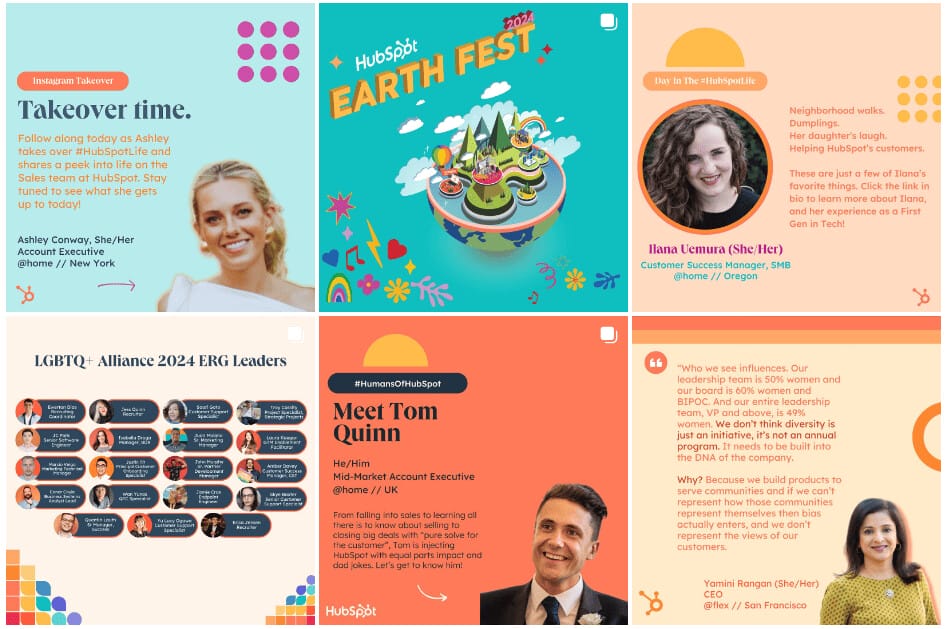
Different content formats help reach specific goals for a blog or business profile. For example, viral content—especially with hashtags—helps grow reach and attract new followers. Posts and stories with questions or polls encourage followers to interact, comment, and react. But if your main goal is to increase sales, it’s useful to add a website link in your profile bio and set up Instagram Shopping to advertise products in posts and stories.
On the official Instagram page of Mailchimp, many types of content are used. These are often short videos or image carousels with captions. You’ll see photos of people, bold text, quotes, and infographics. There’s very little advertising—instead, there’s helpful content that can go viral in certain circles.
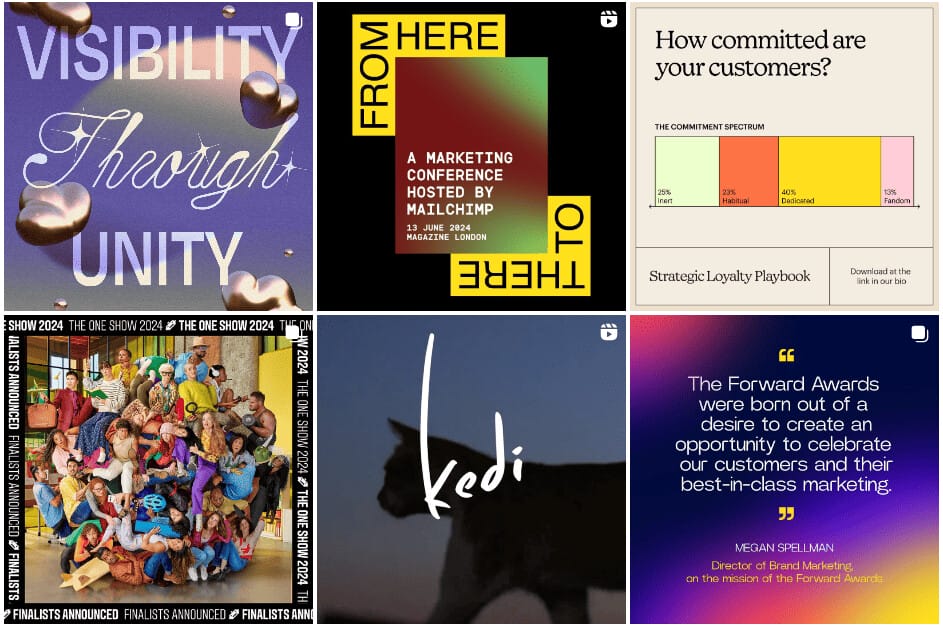
A good example of audience engagement is a call-to-action in the profile bio offering a valuable download: “Our Strategic Loyalty Guide will help you understand where your customers are and how to design a unique strategy for each type of loyalty. Download the guide from the link in our bio.”

To find new content topics, you can use special tools like the Semrush Topic Research tool. This service tracks social media accounts, growth, and engagement levels.
To test the tool, we typed the keyword “premium anti-aging cosmetics” into the search bar and instantly got a list of subtopics.
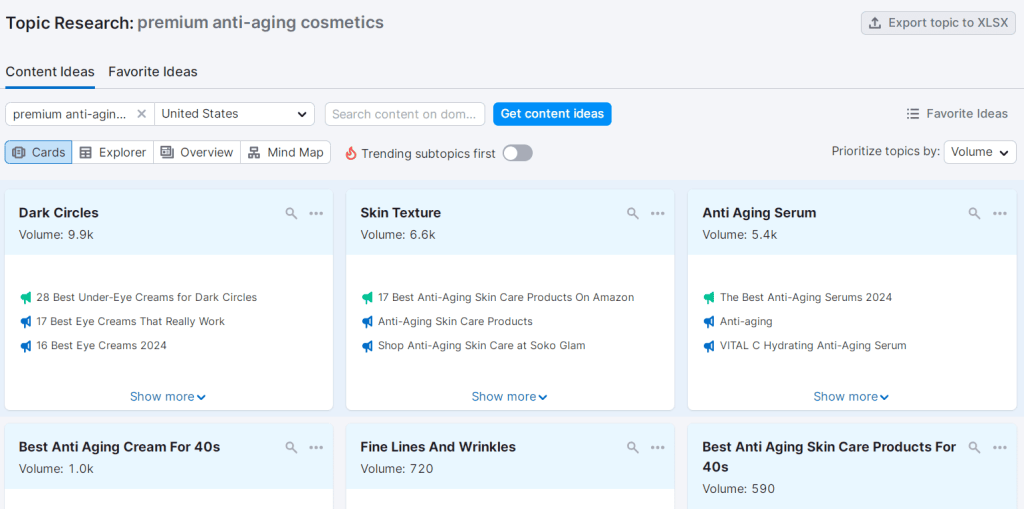
By clicking any of the titles in the “Headlines” section, you can see a selection of well-ranked Google articles on that topic, as well as relevant search terms and questions.

Conclusion
Planning is an important part of content marketing. A content plan for Instagram includes information about scheduled posts and other content formats. Usually, it contains items like “Post Date,” “Format,” “Category,” “Topic,” “Hashtags,” “Post Text,” and “Link to Photo/Video.”
By planning your posts for two weeks or a month, you will always have ready content that is interesting for your target audience. You won’t need to create it at the last minute or copy content from competitors. The content calendar should be analyzed and optimized based on how followers react to different posts, Stories, and Reels. It’s important to track the number of likes, comments, shares, saves, and reach.
It’s important to use ideas that are relevant to your target audience and suitable for different times of the year, connecting them to holidays and other events. You can use special tools and apps to schedule automatic posts on specific days and times and experiment with different content types. Regular planning helps you stay consistent and original when running your Instagram business page.
Frequently Asked Questions
An Instagram content plan is usually a spreadsheet with columns like “Post Date,” “Post Type,” “Category,” and “Topic.” More advanced content calendars also include ready-to-publish texts and links to images.
To create a content schedule for Instagram, you should decide on the best number of posts per week for your page and find out what days and times your target audience is most active on the platform..
To plan 30 days of Instagram content, you can research your competitors, analyze trending topics on other platforms like YouTube, do a brainstorming session, ask your followers, or get help from AI. It’s important to consider current industry events, holidays, and more
The best way is to plan your Instagram posts every two weeks or once a month.
Sources of content ideas include popular competitor pages on Instagram, other social media platforms, forums, surveys, Google search trends analysis, and more.
-
Tags
