


ROAD MAP: EXAMPLES AND WAYS TO CREATE A ROAD MAP
-
Post author

-

Roadmap is a useful business planning tool that helps coordinate actions across departments. The main goal of this document is to visualize how each participant moves toward a shared goal, highlight priorities, and track deadlines. A Roadmap shows the path from point A to point B, but stays flexible and can adapt to changes within the company or the market.
What is it about?
- What is a company roadmap?
- Why create a Roadmap?
- Types of roadmaps in business
- What is Roadmapping?
- Tools for building roadmaps
- Tips for roadmap design
- Conclusion
What is a company roadmap?
A roadmap in business is a strategic tool used for planning and management. It usually appears as a table, chart, or infographic and shows a visual plan for the development of a company or a specific project over a period of time, often using a timeline or table format. A roadmap helps define stages, tasks, deadlines, and how they are connected.
Creating a roadmap gives a clear view of goals, tasks, and the process of reaching them within a specific project or in terms of overall business growth. It helps team members and stakeholders understand what steps will be taken, what resources are needed, and what results are expected and when.
Wikipedia only gives a definition of a technology roadmap, but its meaning is not much different from the idea of a business roadmap.
“A technology roadmap is a flexible planning tool that helps support strategic and long-term planning by aligning short-term and long-term goals with specific technology solutions.”—“Technology roadmap,” Wikipediа
Roadmapping helps plan in advance what experts will be involved in each area of company growth, how many resources will be needed, and what might affect the outcome. Roadmaps usually include dates or rough deadlines but do not describe detailed tasks for each person involved. How accurate the timing is depends on the type of roadmap: for example, in a product roadmap, clear dates are more important than in a strategic business roadmap. The main goal of a roadmap is to show how all the elements are connected and the order in which actions should happen.
Creating a business development plan comes before making a roadmap. The appearance and structure of these documents are very different. A business plan usually includes an introduction, a description of the company and its activities, market analysis, strategy, financial forecasts, and risks. Sometimes parts are shown in a SWOT analysis. At the same time, a roadmap is shorter and more visual, making it easier to present the plan of action to investors, partners, and team members.
“While a business roadmap is similar to a business plan, these two documents have key differences. A business plan is a detailed document that explains the company’s structure, operations, and goals. Many entrepreneurs and managers create business plans when starting new companies. It’s usually longer than a roadmap and focuses on the company’s market value and potential, rather than its internal strategies and actions.”—“11 Business Roadmap Examples (Plus What To Include),” Bobbie Anne Munsey, Indeed
Elements of a Roadmap
Team’s main goal
Team members should understand where the journey starts and where it should end. There may be several clear and specific goals. These are long-term plans for a company, project, or product.
Division by departments
This helps to spot resource problems in time and set priorities correctly. All team members will know not only their own tasks but also the responsibilities of their coworkers.
Activities and their goals
Describe the tasks that need to be completed to reach the set goal. These actions should be clear and measurable (for example, “Increase sales from Instagram by 50%”). Ideally, connect each task to the main goal and mark it with a specific color. Each item should have clear expected results.
Deadlines and progress tracking
Depending on the format of the roadmap, you can move tasks around based on their progress or add text notes or percentage indicators. The most urgent tasks can be marked with special tags, colors, or symbols. By the way, in product roadmaps, exact dates are optional, unlike in business roadmaps where they are more important.
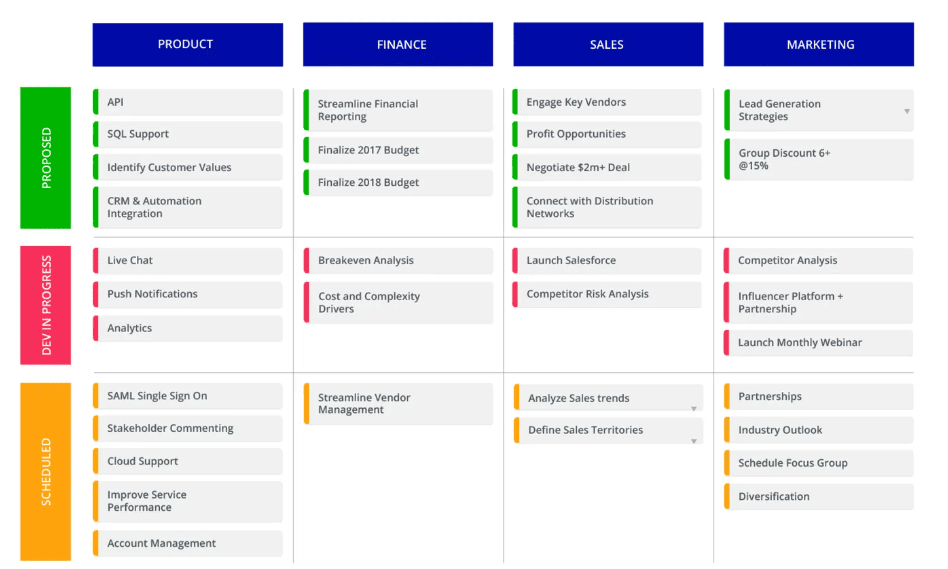
Sometimes, key milestones are also included. This term is used in project management and means an important point in time, like moving to a new stage in a project or in the company’s growth. It could be opening new physical locations or launching a product update. Which achievements should be shown depends on the goals. These are transition points when the person in charge of the roadmap reviews and updates it, informing the team about the changes.
Additional Roadmap Elements
- Risks—actions or situations that might block the goals or cause delays in deadlines;
- Ideas for project growth—hypotheses or options for the company’s development;
- Tools used, promotion channels, or motivation systems;
- A clear list of team members and their responsibilities;
- The level of workload at each point of the roadmap.
The structure of a roadmap is not fixed. A business owner can make it more detailed or very short.
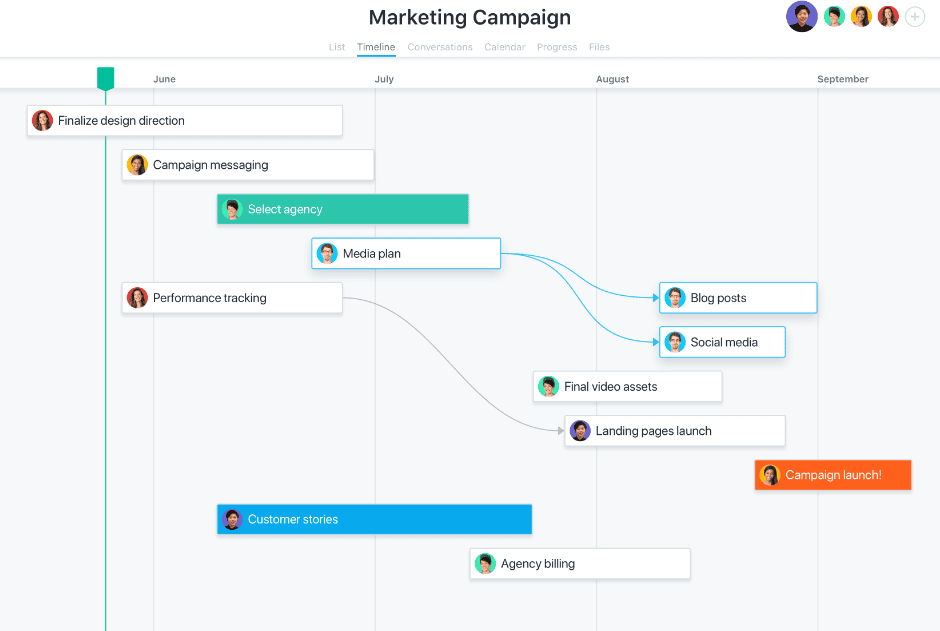
Roadmaps can be helpful for marketers, project managers, HR representatives, product managers, IT managers, salespeople, startup founders, and entrepreneurs who are planning to look for investors or partners.
Why Create a Roadmap?
If we don’t know the road but need to reach a location as quickly as possible, we use a GPS to find the best route—avoiding traffic, road work, and other obstacles. A modern roadmap is like an interactive map that updates in real time, unlike a static paper map that may show outdated information. Either way, going without any direction is not a good idea—you need guidance.
Sometimes companies have to make big changes in how they operate. This might include changing the business model, using different technologies, or moving. In these cases, a roadmap is a great tool to show what changes are coming to each department. It helps see the full picture, combine resources, and make predictions about the company’s future.
Road maps are also helpful when new opportunities arise or when the business is growing. For example, while the company worked as a copywriting studio and the team had only six specialists, everything could be simple and clear without any map. But once it expanded into a marketing agency and created sales, marketing, and development departments, a clear action plan with task distribution became necessary.
A roadmap that is available to all team members acts like a guide for both new employees and experienced top managers. Again, it will be helpful when launching a new product (or introducing a new service), because different specialists will need to take part in its creation, promotion, and improvement. Thanks to the map, it’s easier for departments or individual professionals to work in parallel on shared or related tasks within the project.
This tool is used over a long period of time but should be reviewed as often as possible. It may be a good idea to set time aside to update the map during weekly meetings or online calls twice a month. The person responsible for creating and managing the roadmap is usually the company leader or a high-level professional, like a project manager. This person is in charge of communication between departments and making sure deadlines are met.
A roadmap answers the questions “Who?”, “What?”, and “When?”. It shows which department or specialist is responsible for a task and when it should be done. But it should not answer the question “How?”. Otherwise, it would become too complicated and long and lose its value. The person in charge of the roadmap must evaluate the real situation, compare it to the plan, and make timely changes when needed.
Unexpected updates may involve not only timing but also project participants. At some point, it may become necessary to outsource some tasks. This could be because of expensive software, lack of qualification, or specialists being too busy. The project manager adds new contractors, partners, or investors to the roadmap and continues to oversee its progress.
Why You Should Use a Roadmap
Saving Time for Team Members and Managers
Since the roadmap includes all key information about a business or a specific project, it’s always available for all stakeholders to review. The information is organized, clear, and often visualized using icons, fonts, or color codes. This makes it easier to see the status of each task without distracting team members from their work.
Setting Goals
A well-designed roadmap helps define the main goals, plan the budget, and set smart priorities. It also allows you to predict possible challenges and risks, so you can focus on the most important tasks first. If needed, you can delegate or remove some tasks from the action plan.
A Shared Vision of the Project
Each team member may have a different view of which tasks are most important. A roadmap helps prevent confusion by showing intermediate results—like updates about delays caused by license issues—so everyone stays aligned.
Organizing Collaboration
Having a clear and concise roadmap is crucial if the company needs to bring in external collaborators such as investors, partners, or influencers. It also helps onboard new employees, including new managers, by giving them a quick overview of the project.
Being Ready for Challenges
Outlining possible risks—such as funding shortages or changes in market regulations—allows you to plan ahead with backup solutions and stay resilient even in tough situations.
In general, a roadmap, like a regular travel map, helps you reach the final goal faster and with fewer costs. It helps you manage resources wisely, meet deadlines, earn stakeholder trust, and coordinate your team’s efforts.
Roadmaps are used in many fields. Most often, they’re used for software development, online services, mobile apps, and websites. In these cases, the project manager needs to track many tasks, manage team communication, and make sure everyone stays on schedule—both individually and as a group working toward a shared goal.
A product roadmap is perfect for organizing the development and launch of a new product or service, including creating a go-to-market strategy. Marketing roadmaps help plan and track ad campaigns, manage budgets, handle media planning, measure the effectiveness of tools and channels, and analyze team or individual performance.
A typical use case for a roadmap is launching a new IT solution, upgrading a product, or guiding the overall growth of a company.
📌 Read the article: Creating websites
Types and Variations of Business Roadmaps
There are two main types of business roadmaps—waterfall and Agile. Agile roadmaps are more popular and have almost replaced the waterfall type.
A static waterfall roadmap usually shows a sequence of actions planned for several years. It is not editable, meaning it lacks the flexibility of Agile roadmaps. Today’s planning methods usually describe how to reach goals over a few months, and almost all parts of an Agile roadmap are adjustable—they can be changed when needed.
| Features | Cascading Roadmap | Agile Roadmap |
|---|---|---|
| Goals | Long-term (one year or more) | Mostly from one month to one year |
| Planning Duration | One year or several years | On average—2,000 characters without spaces, often a quarter or several months |
| Review Frequency | Once a year | 4-5%Once a month or quarter4-5% |
| Resource Allocation | For a project or the whole company | For individual teams |
| Collaboration | Synonyms, related in meaning | Parallel across groups |
| Investment | Sequential across groups | Strictly distributed Can be reallocated |
So, waterfall-type roadmaps have minimal adaptability. In contrast, Agile roadmaps are made for user convenience—they are adjusted based on the conditions in which goals are being implemented.
There are several types of roadmaps based on their purpose:
- Product roadmaps (for creating and promoting a service, product, or product line)
- Technology roadmaps (for implementing technologies)
- Corporate roadmaps (for achieving long-term company goals)
- Industry roadmaps (for the development of a market sector or industry)
- Educational roadmaps (for training programs, motivation systems, etc.)
- Project roadmaps (for project implementation strategies)
Sometimes, roadmaps are categorized based on how they’re executed. This affects their structure.
- Timeline—a task list with deadlines, KPIs, names of responsible team members, or department names, etc.
- Management plan—a visual layout of intermediate results with descriptions of executor actions. This is often built from the project’s master plan.
- Expert analysis—may take the form of a layered diagram with key milestones and visible connections between them.
- Concept—after defining a development strategy for a project, product, or business, possible scenarios are created. These hypotheses are visualized in diagrams. This roadmap serves marketing, communication, and planning purposes.
When we talk about roadmaps, we usually mean Agile-style map—specifically, corporate, product, or project timeline formats. You can decide on the type and format of your roadmap while preparing information for it. Based on this, you should choose the most convenient format and template and decide which tool or software will be used for roadmapping.
It’s important to note that business roadmaps differ from product roadmaps. Business roadmaps are more execution-focused and specific, while product roadmaps show fewer concurrent actions. A business roadmap is an intuitive visual that shows the steps to bring a business strategy to life.
For convenience, functional teams are often grouped into moving swimlanes, and color-coding is used to represent strategic goals. For example, swimlanes can show different functional areas of the company, such as operations, marketing, product development, and PR.
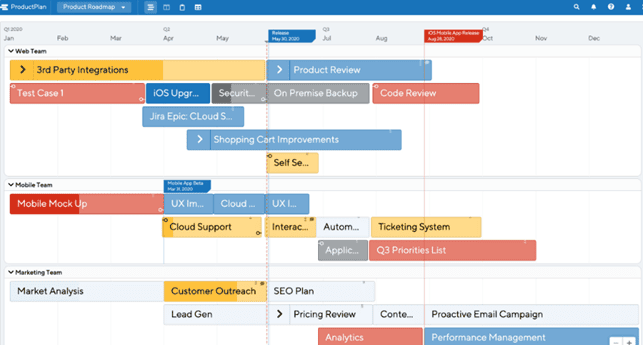
A roadmap helps align goals between different departments in a company. This makes it easier to assign roles in implementing the company’s growth strategy and track the workload and effort of each team involved.
How does Roadmapping work?
Roadmapping is the process of creating roadmaps, following a specific method.
First, it’s important to clearly separate a roadmap from a business plan or a task tracker. This document does not include detailed descriptions of tasks and subtasks. It gives the team direction but not step-by-step instructions.
Strategies and manuals should be placed in other files—they are not part of the roadmap. Before you build a roadmap, define your goals, metrics to measure progress, an action plan, timeframes or approximate timelines, and status markers. These markers help monitor progress.
A well-made roadmap has the following features:
- Flexibility—showing several ways to reach the main goal
- Strategic impact and financial value
- Interactivity—the ability to update it by selected or all users
- Transparency—using shared KPIs to evaluate results
If your actions can clearly be broken down into steps, you can start creating the roadmap—either manually in spreadsheets or with online tools (covered in the next part of this article).
Stages of Building a Roadmap
- Define the target audience.Who are you making the roadmap for—experts, investors, or customers? Maybe you’ll need a custom version or a universal one. The audience affects the structure and level of detail.
- Set goals and tasks. The size of the task list affects how complex the roadmap will be. This is where you can highlight what’s essential and leave out the rest.
- Choose the type of roadmap—waterfall or Agile. Agile is recommended, as it’s more flexible and useful. At this stage, also define the roadmap type based on its goals and how it will be used.
- Timing. This part can be the most difficult. You’ll need to decide the order of tasks—some can run in parallel. Add extra time for big tasks and subtasks.
- List metrics and resources. Add KPIs to objectively track progress. Include tools and resources you’ll use—this affects the budget and may influence deadlines.
- Pick a tool and template to design the roadmap.
- Add team members. After assigning tasks, give team members access to the online table or roadmap. Decide who can edit and who can only view or comment.
To finish, calculate the budget to implement the roadmap. This includes software fees, team salaries, and marketing, advertising, and material costs.
Tools for Building Roadmaps
The easiest way is to make a roadmap in an Excel spreadsheet. You can share it with team members and edit in real time. This works well for small product roadmaps. But the more elements and connections you need to show, the harder it is to visualize in a basic table without extra tools.
Office Timeline
To make better roadmaps in Excel, use software with templates—like Office Timeline, which also works with PowerPoint. You can also use tools like Google Sheets and templates like the Agile Kanban Board.
To create a roadmap in Google Sheets, you need to open a new document and label the columns with the stages or sprints of the product development process. After that, you can add rows for each feature, set the dates, and fill in the stages. The main drawback of using Google Sheets for building roadmaps is the lack of advanced features for complex planning and visualization.
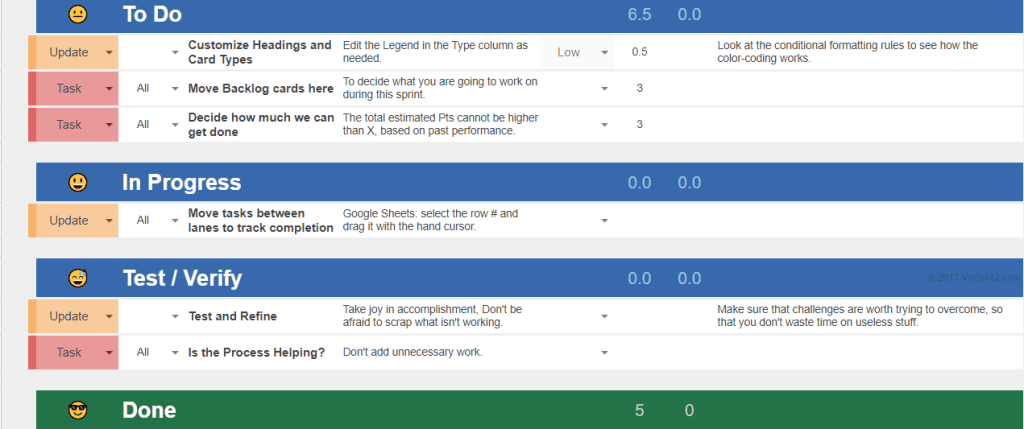
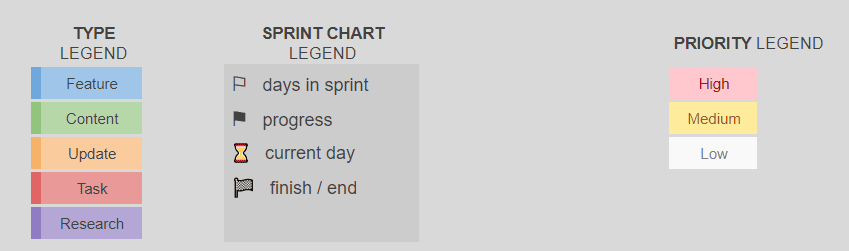
Legend makes it easier to navigate the map and understand it for new users.
Trello
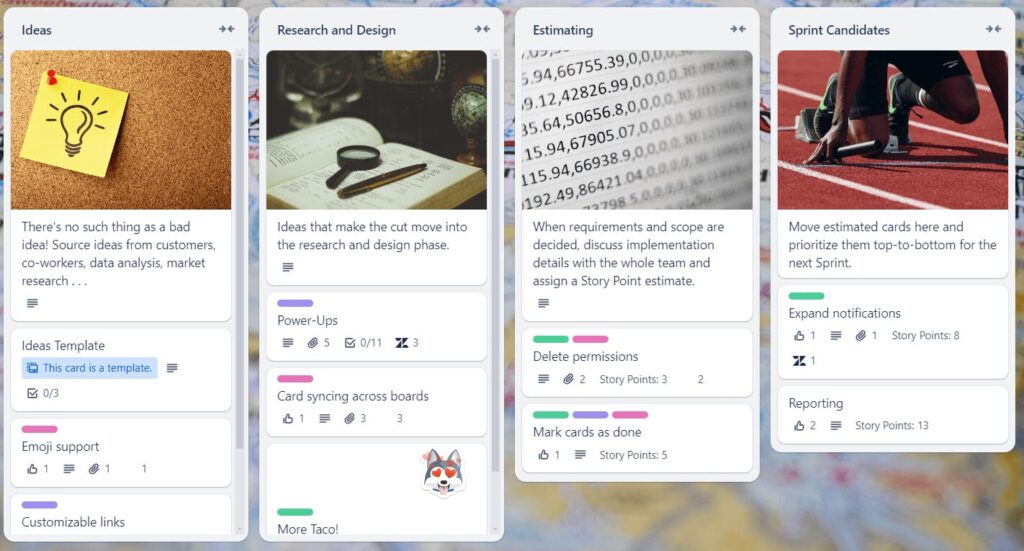
Kanban-style boards are easy to create in Trello. Its “Product Roadmap Template” lets you create free project boards with checklists and simple, easy-to-use labels like bright stickers and color tags.
Standard programs have limits compared to special business roadmapping tools. They slow down when there’s too much information. They also have some limits when you need to connect them with other project management tools. Let’s look at a few of the most popular online roadmapping services.
ProductPlan
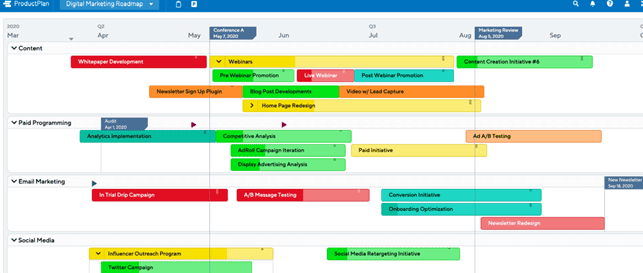
ProductPlan lets you create roadmaps as tables and share them. You can choose a timeline, filter data, and connect the online document with other company tools like Trello or Jira. There’s no limit to the number of users or roadmaps. Data is protected with SOC 2 certification and strong security features.
There is a basic plan for $49, a professional one for $89 with a 14-day free trial, and a custom plan for enterprises. The main downsides are the high price and no ready-to-use templates. Still, the tool has enough features to make detailed and interactive roadmaps.
Mondey
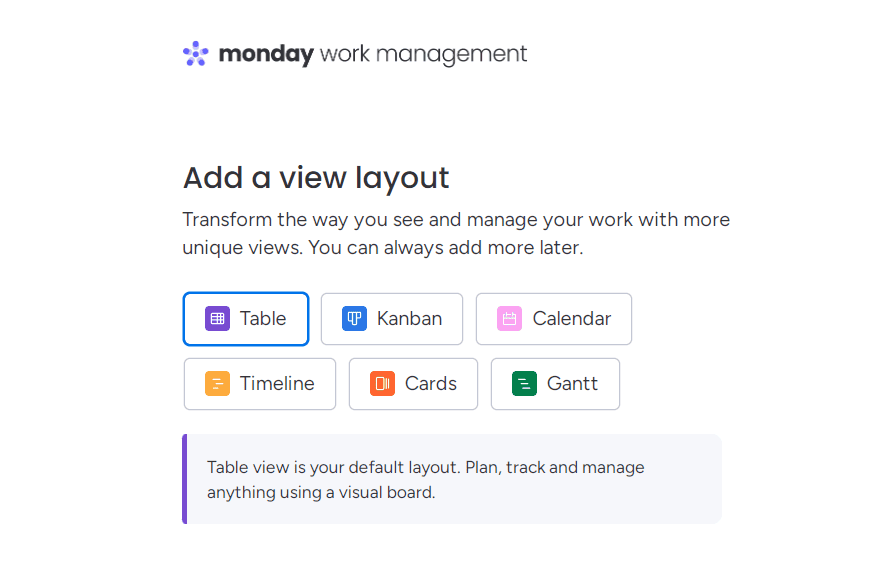
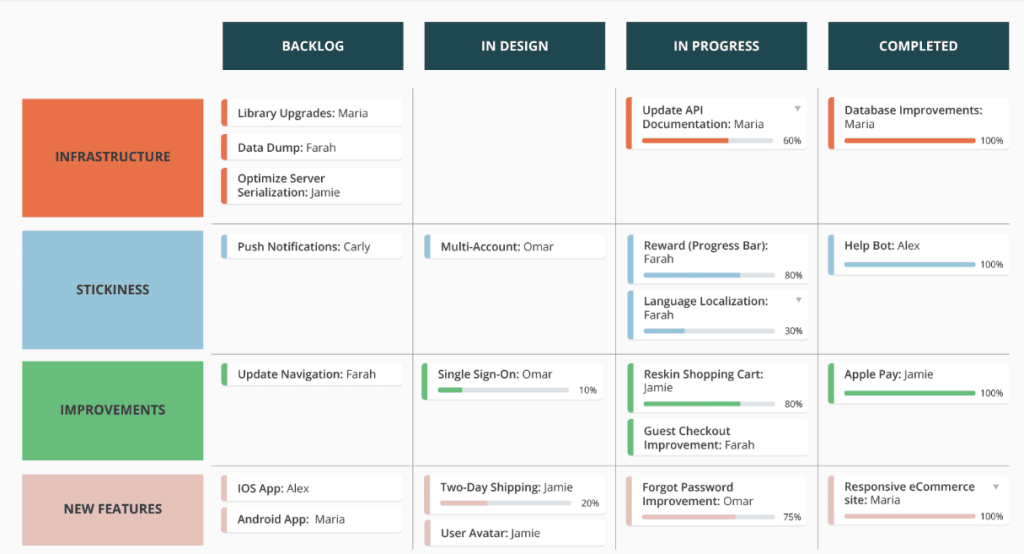
Mondey uses tables by default, but you can switch to other visual boards like Kanban, calendar, or cards.
Making roadmaps is free for one or two users. For larger teams, plans start at $10 per month. You can add useful tabs like “Tasks”, “Status”, “Deadline”, “Priority”, “Notes”, “Budget”, “Files”, and “Timeline”.
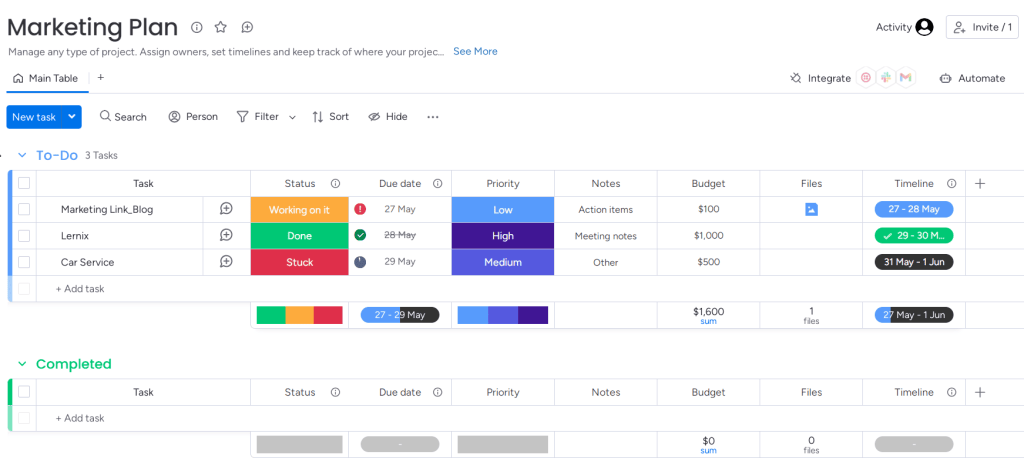
Icons and color labels make it easier to find tasks.
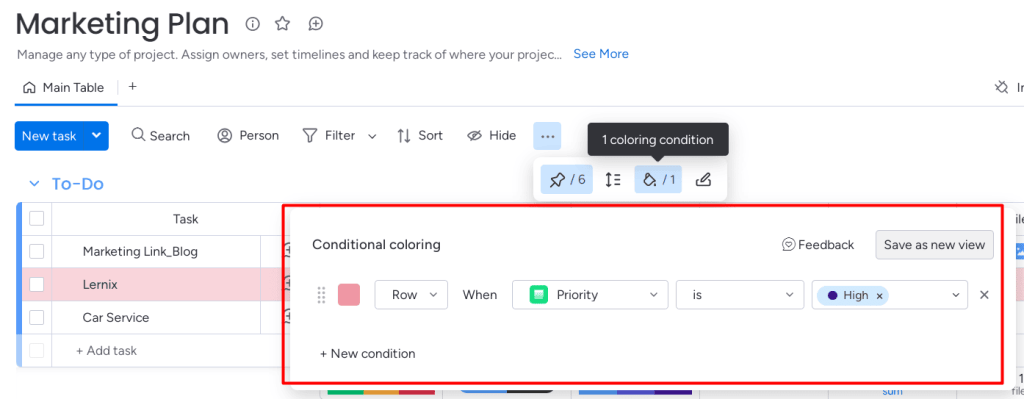
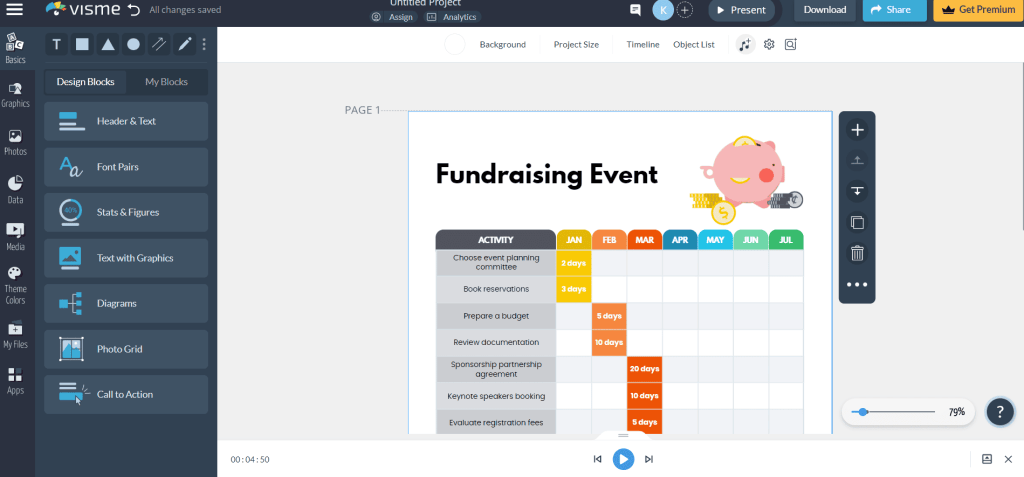
Visme
The online roadmap builder Visme offers many free templates.
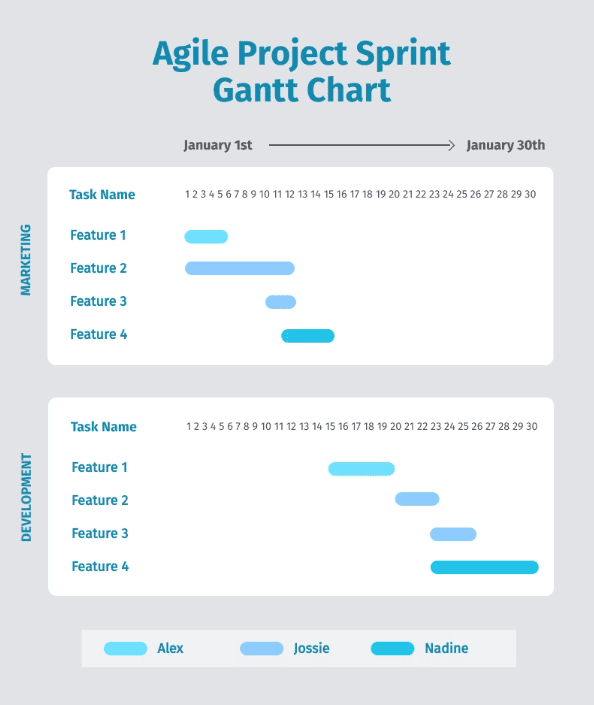
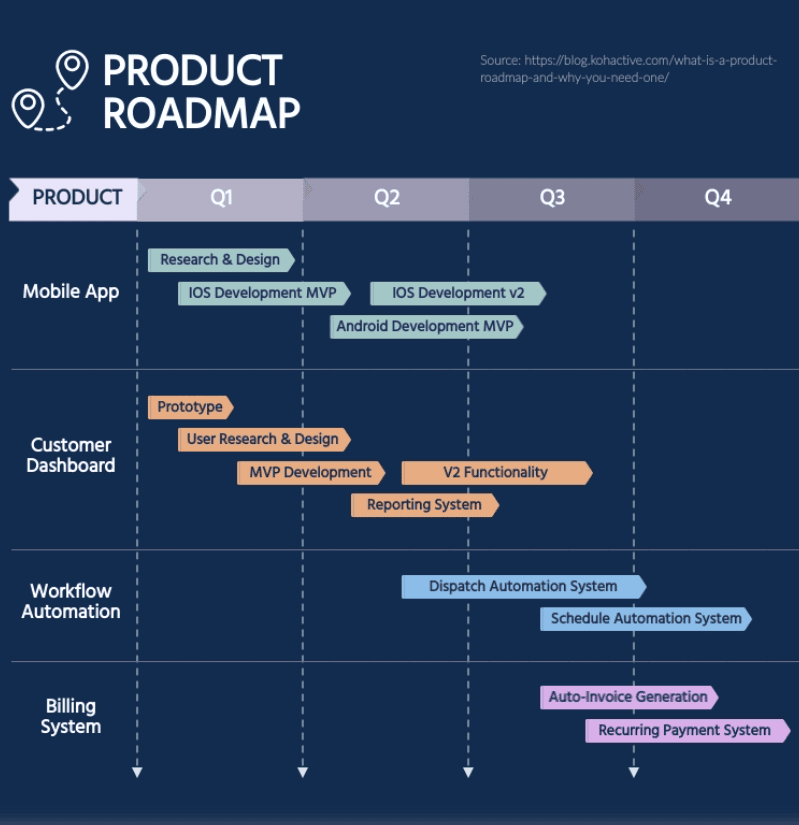
You can add your brand’s colors and fonts, use illustrations, icons, photos, and free fonts. You can download the roadmap as an image file or add it to a website. The tool is free to use, with a premium version available.
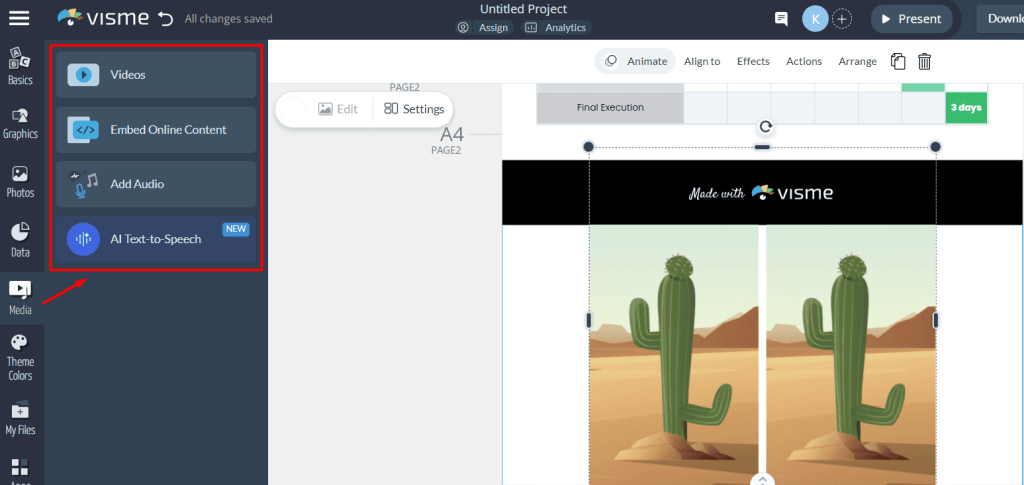
You can add media and make multi-page documents with interactive elements. You can upload your own files or use the built-in library.
Tempo
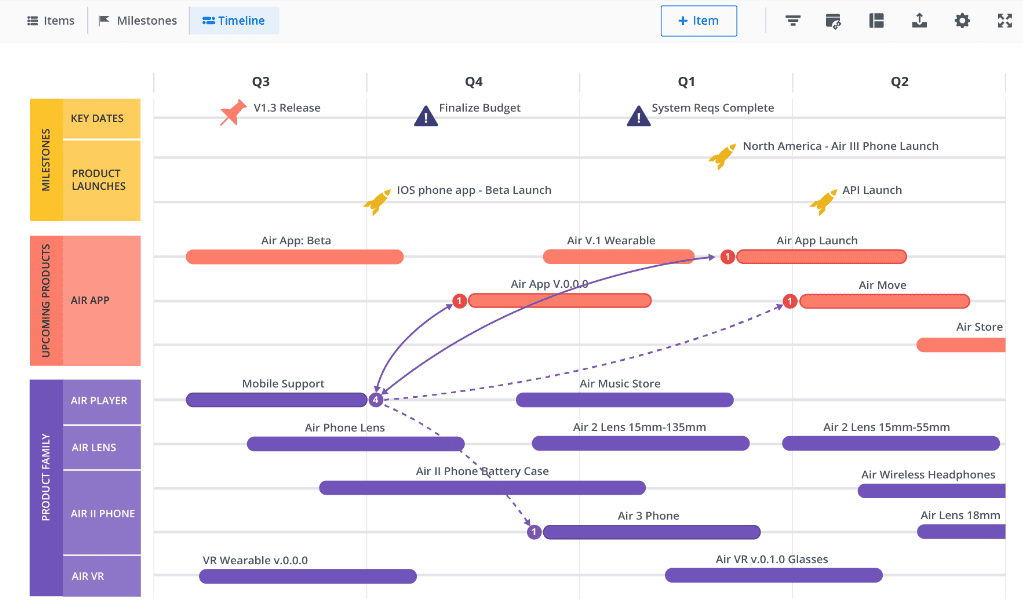
The Tempo tool for creating roadmaps offers options to visualize timing—it can be a timeline or a floating bar. Roadmaps can be exported in URL, PNG, and HTML formats. A user can create two levels of roadmap items, mark key dates to compare stages or decision points, and show completion status using a progress bar. The pricing is a bit steep: 14 days of free use and several plans—$19, $49, $99, and a custom enterprise plan.
Roadmap portfolios help executives and product managers talk not only about how a single product will grow, but also about how different products are connected. They are especially useful for companies with many product lines.
Asana
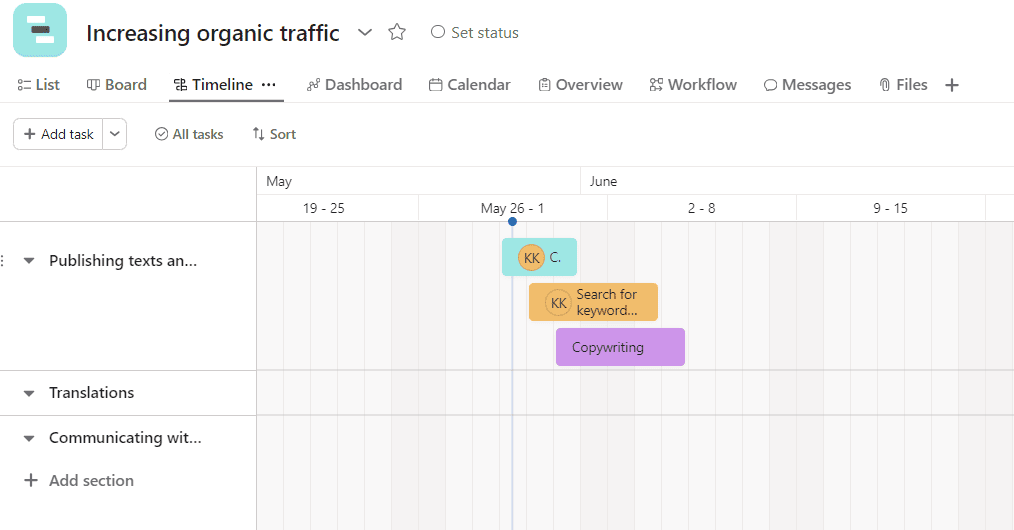
В Asana is free for teams of up to 10 users. During the 30-day trial, you can use paid features like timeline, portfolios, and more.
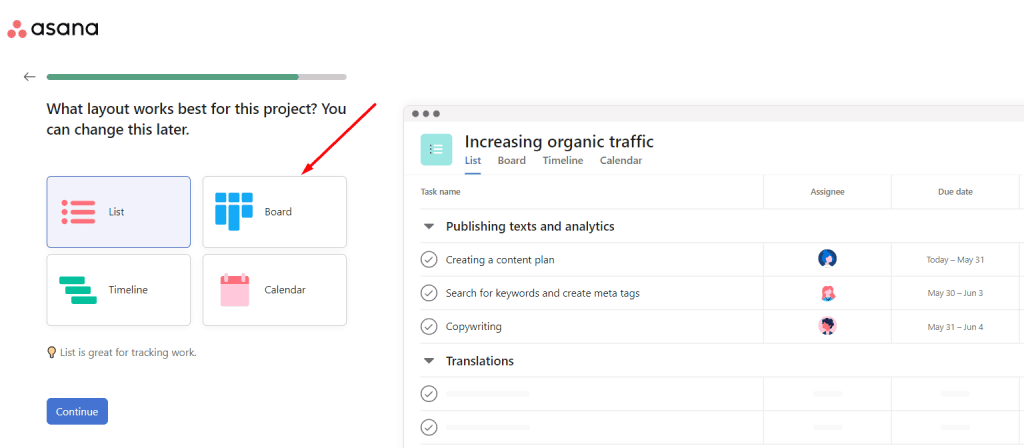
Advanced plans cost $10.99 and $24.99 per month and are designed for growing teams and companies with a large number of departments, respectively.
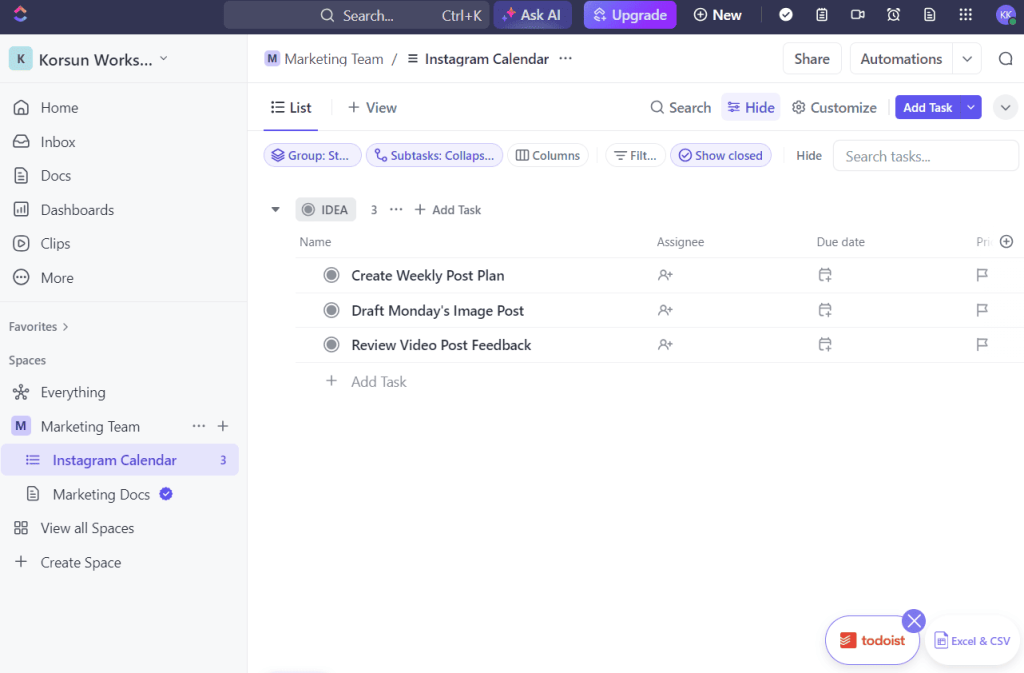
Click Up
Click Up It offers about 50 integration tools, including GitHub, Slack, and Google Drive. During sign-up, users can choose which services to connect with ClickUp. The tool provides many templates, unlimited storage, and in the Business and Enterprise ClickUp plans—priorities, advanced time tracking, and progress monitoring. Prices are affordable, even for paid plans. It’s $7 and $12 per user per month.
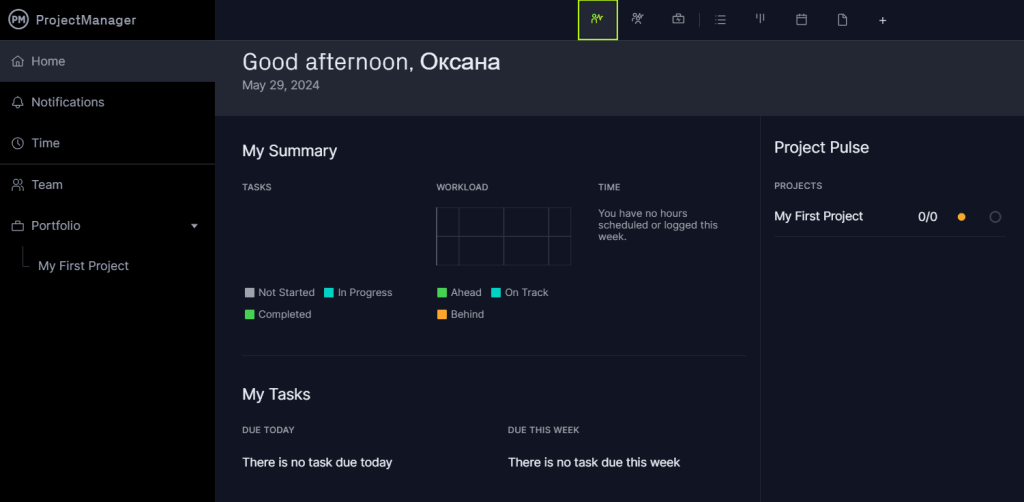
ProjectManager
ProjectManager is a good fit for creating Waterfall and Agile roadmaps. It allows you to track reports and time, manage resources, export in formats like XLS, MPP, XML, CSV, and integrate with different tools.
📌 Read the article: “How to Create a Company Page: With Inspiring Examples”
Tips for Creating Business Roadmaps
No matter which roadmapping tool you choose, it’s helpful to follow some basic tips for building your roadmap. Knowing how to visualize business processes, staying consistent when creating different elements, and making sure everything connects well can help you save time and plan for possible risks as your company works toward its goals.
- Use themes
Clear theme names and color tags help you stay organized when managing large lists of tasks. It also helps you spot what’s shared and what’s different between roadmap sections. Business roadmaps often have more simultaneous activities than typical product roadmaps, so you may need more themes. Example themes include “filling the product catalog,” “developing the mobile version,” or “preparing the website for launch.” - Define clear outcomes for each item
Each goal should be positive and measurable. It’s best to include numbers for every sub-task—especially for major tasks and shared goals. - Use swimlanes
This is a convenient way to show different areas of responsibility. With these moving rows, you can mark geographic regions, team divisions, or any other categories—just like in ProductPlan.
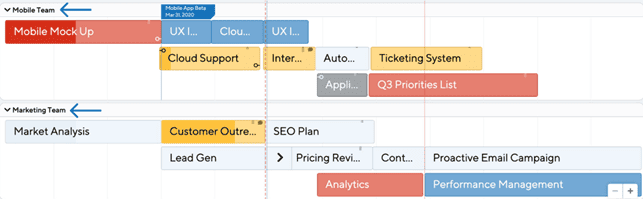
Use high-level categories and attach other roadmap items to them. This can be helpful for grouping strategic tasks that have subtasks, shown as “swimlanes.”
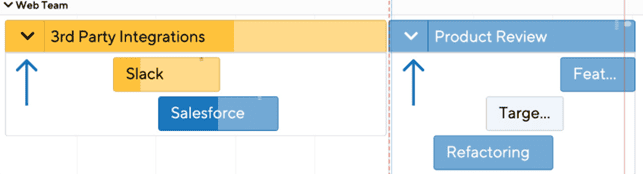
- Show the completion percentage
A well-structured product roadmap should include up-to-date information about the status of each task that is easy for all team members to access. This helps the team stay aligned if someone misses a deadline. - Add tags
Tags make it easier to revisit the roadmap during the development process, track goals, and assign responsibilities. For example, if a team member, project manager, or partner wants to quickly review all roadmap items related to advertising, they can filter the roadmap by the “Advertising” tag. - Show connections between items
This feature is available in ProductPlan and many other tools. Connections help show how planned processes depend on each other.
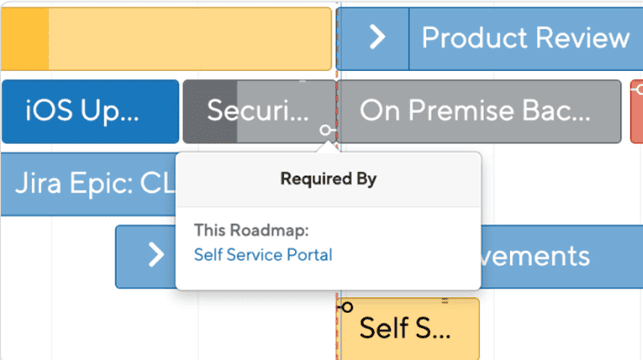
For convenience, you can add a page that explains your product roadmap or even a video tutorial with a screen recording and voice-over. This helps new users quickly get familiar with the roadmap and understand its components.
- Make the roadmap branded
If you want your roadmap to look professional and reflect your company’s identity, make it branded. Use brand colors, relevant visuals, and a consistent tone of voice.
Make sure every task in the roadmap clearly contributes to the overall goal. Some initiatives might be better saved for other roadmaps or postponed to avoid distracting the team and wasting resources.
You can create a standardized template to save time when making future roadmaps. Assign tasks and projects to specific owners so that each participant gets notifications and has a personal task list.
It’s very important to set aside time each week to review and update the roadmap. If you’re showing the roadmap to someone outside the team (like a client you’re working on a project for), add notes with the dates of the last updates and a workload schedule for different stages. This helps explain any temporary pauses in the plan and shows why they make sense.
Conclusion
A business roadmap shows the roles of different team members in a company. It explains the tasks and how fast they are completed, shows the connections between goals, and tracks performance at each step. Product roadmaps help organize the process of creating, improving, and promoting a specific product or service.
Unlike a business plan, a roadmap only includes the main milestones of the project. It doesn’t have detailed descriptions but includes all process elements needed to reach the goal. The advantage of modern Agile roadmaps is their flexibility—they can change when needed. A project manager should review the roadmap every week, make updates, and inform all team members.
A typical business roadmap includes:
- goals (shared and individual);
- deadlines and a timeline;
- list of responsible people;
- company departments or other categories;
- risks and obstacles;
- ideas and possible changes;
- tools and communication channels;
- workload level.
The roadmap is widely used in project management and business analysis, especially in the IT field. It helps improve productivity in different departments and for individual specialists. Most importantly—it helps you stay updated on task progress.
A roadmap is also used for managing resources and identifying possible risks and problems. It helps organizations see the full picture and plan their way to the goal. It organizes the task order based on priority. With a project roadmap, you can share your plans with stakeholders and clients and improve communication between departments.
Frequently Asked Questions
A business roadmap is a visual plan of the company’s main goals. It shows how different roles, tasks, and responsibilities are connected.
A typical startup roadmap includes the mission and goals of the business, a detailed target market analysis, product development plans, marketing and sales strategies, daily operations management, financial forecasts, and key KPIs.
A business plan is a formal document that explains the company’s vision, structure, and main goals. A roadmap supports the plan and helps bring it to life.
To create a business strategy roadmap, define your goals, an action plan, deadlines, and use status markers to track progress. Choose key metrics to measure success at each stage.
A strategic roadmap includes the company’s business model, action plan with deadlines, business goals, target audience segments, competitor analysis results, an audit of the website and other platforms, and promotion tools.
The strategy is the foundation of the business plan and comes before the roadmap. The roadmap helps apply the strategy and supports product growth and marketing efforts.
To build a correct roadmap, you need to show all the important information about goals and how to achieve them. Add labels, show links between elements, and use different colors for categories.
In the roadmap, include the target audience, company goals, team tasks, names of departments or team members, roadmap format, key metrics, resources, deadlines, software, budget, and strategy. Break big tasks into smaller steps.
A business roadmap is usually made by the company leader. But a product or project roadmap can be created by a project manager or a marketer.
-
Tags
