


UP TO 757% ROAS GROWTH FROM ZERO FOR A PROFESSIONAL CLEANING PRODUCTS DISTRIBUTOR: GOOGLE ADS CASE STUDY
-
Post author

-


This case study demonstrates how to achieve a stable average monthly ROAS of up to 757% and increase sales volume from an owned website.
Google Ads
Service
Cleaning Products
Industry
Ukraine
Target Region
Results
+202%
Traffic
757%
ROAS
+1085%
Transactions
Client
Our client is an official distributor of professional cleaning products for the HoReCa sector, as well as other cleaning products for businesses—from cleaning companies to laundries and manufacturing facilities. The products are environmentally friendly and safe for users and the environment, as reflected in the slogan “Safe For You | Safe For Earth.”
The brand’s products are new to the Ukrainian market. In the early years, the client operated without any advertising. Later, they created their own website to increase B2B sales; however, the number of orders remained low, so the client turned to Marketing Link for advertising setup and management.
Marketing Audit
We started working with the client in June 2024 and immediately identified the main advertising priorities. The work essentially began from scratch, as the client did not consider paid search a priority channel and focused on participating in exhibitions. The first step was creating a Google Ads account. We completed the company information, added valid billing details (since any attempts to bypass Google policies lead to immediate suspension and long-term advertising restrictions), and completed advertiser verification.
Advertiser verification gave us access to advanced ad assets—such as the business name and logo. Their main advantage is that they help a business stand out from competitors who have not implemented them yet, increase user trust, and improve CTR.

Expert Comment
The approach to Google Ads for B2B differs from B2C—it is more difficult to track repeat sales, not all clusters of search terms are equally relevant, and it requires a more systematic approach to performance analysis.
Search campaigns perform best with exact match keywords and, optionally, phrase match—without broad match. Keep in mind that a keyword is not the same as a search term, and AI Max search terms are not particularly effective for B2B, while additional audience signals effectively enhance campaigns.
While Performance Max campaigns in some B2C cases can perform even with basic setup and minimal optimization—in B2B, we split all categories into separate campaigns, worked additionally on ad quality scores, and actively filtered search terms (yes, this has been available even in Performance Max campaigns for almost a year). Of course, special emphasis is placed on audience signals and targeting a professional audience.
Marketing Link has strong experience working with exclusive distributors and manufacturers—we evaluate not only ROAS and CPL but also help optimize LTV and transform the marketing funnel from a black box into clear, measurable results.
Analytics Setup
The second step was proper analytics setup. Why is this important? Properly configured analytics is the foundation of any marketing strategy because it allows you to see which campaigns generate actual sales, the cost per lead, traffic quality, which campaigns should be scaled, and which should have reduced spend—in other words, it is your “eyes” in advertising.
To evaluate campaign performance, we created a Google Analytics 4 account and completed the following setup:
- connected Google Search Console;
- implemented Google Tag Manager;
- linked the Google Ads account with Google Analytics 4;
- configured event and conversion tracking.
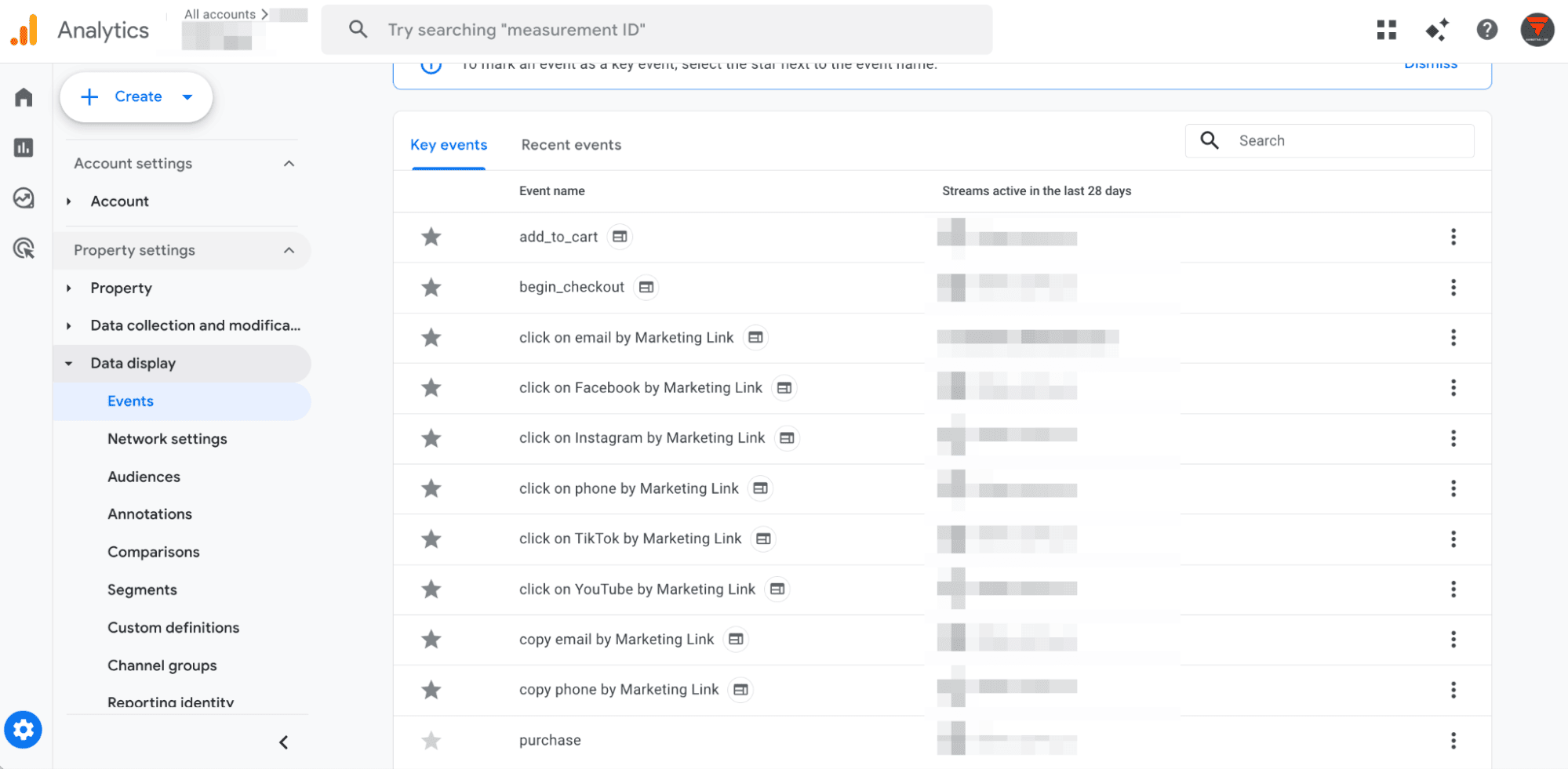
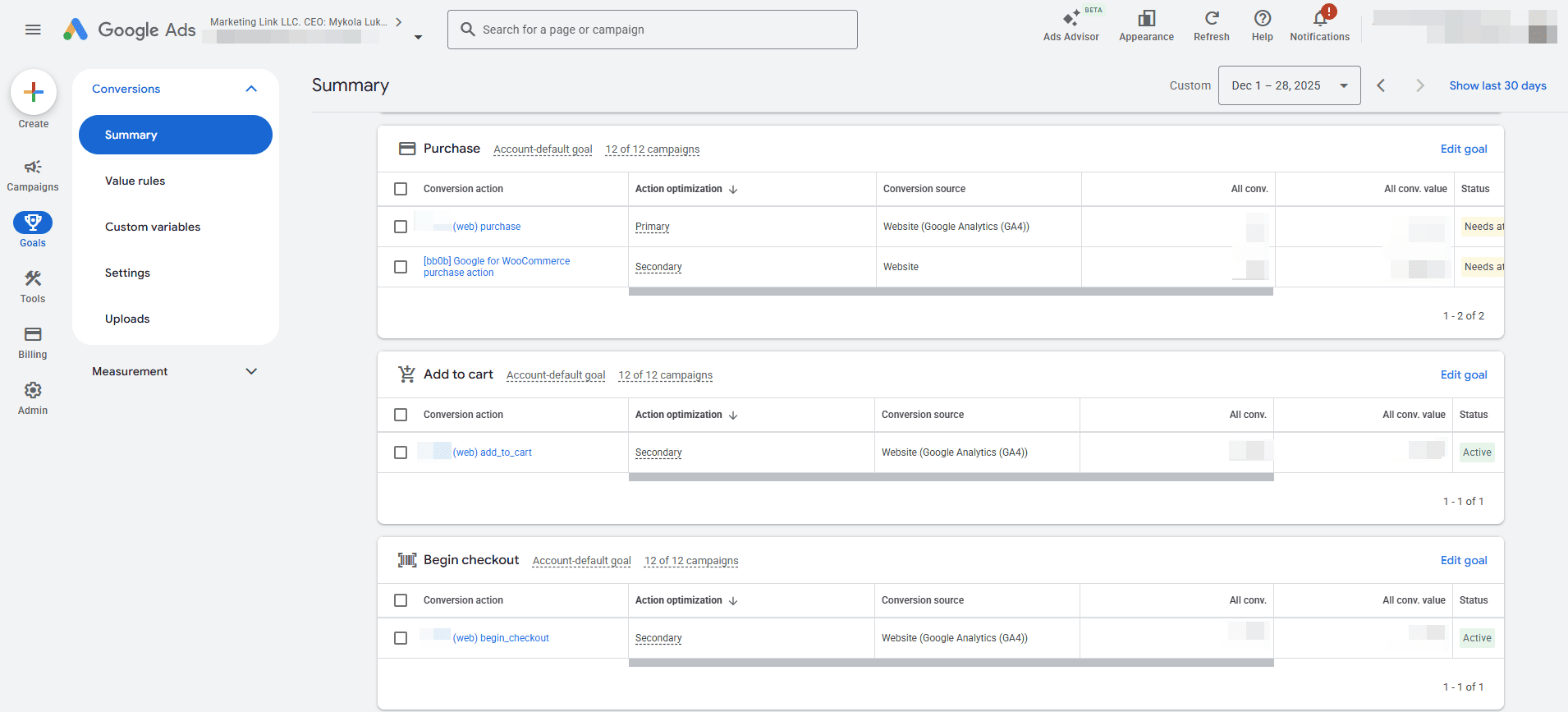
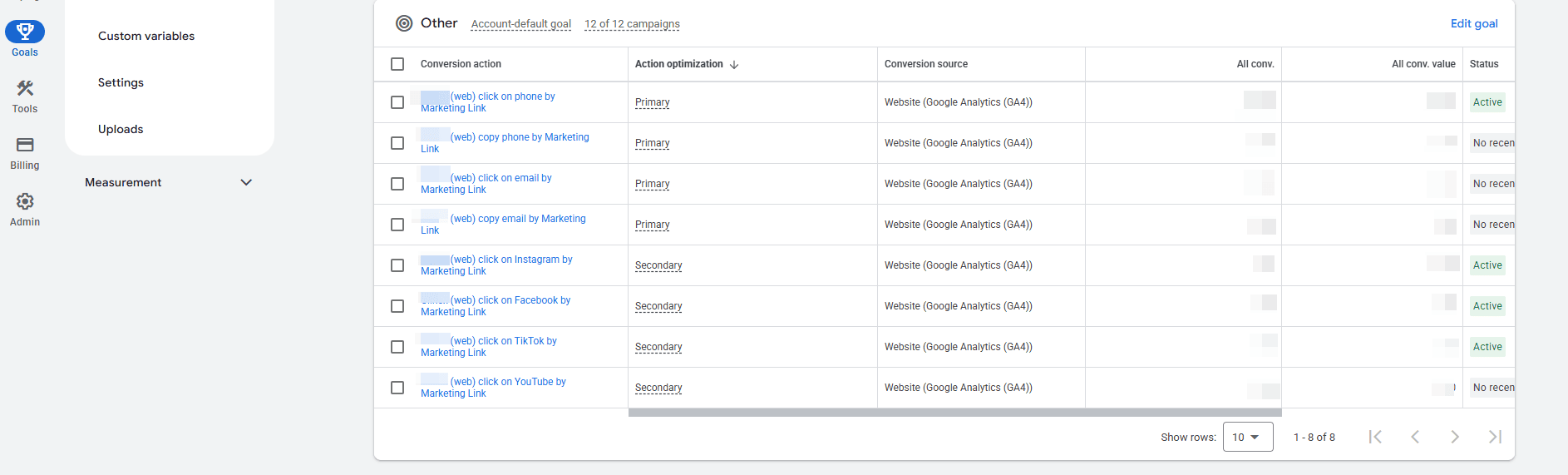
We imported all relevant conversions from Google Analytics 4 into the Google Ads account, assigned primary and secondary conversions, and created remarketing lists.
The primary conversions used for campaign optimization were:
- transactions;
- email click and copy;
- phone click and copy.
Advertising Strategy Google Ads
Search Campaign Setup
Considering that the client had a newly created Google Ads account, we decided to set up 5 search campaigns for priority categories during the first month to “warm up” the account and build trust with Google.
This approach had several advantages:
- higher traffic quality, as ads were shown to users with clear intent;
- Google algorithms learned faster;
- search queries were easier to control;
- irrelevant impressions were easier to avoid.
When setting up campaigns, we selected keywords that primarily reflected product names on the landing pages.
The main principle in keyword selection was to focus on narrow keywords with sufficient search demand and a logical structure.
For example, for the campaign [ml] — Dishwasher Cleaning Products, the following keywords were selected:
| Keyword (by relevance) | Avg. monthly searches |
|---|---|
| dishwasher cleaner | 50 |
| dishwasher cleaning products | 140 |
| dishwasher cleaner solution | 10 |
| dishwasher detergent | 140 |
| dishwasher cleaning agent | 20 |
| dishwasher products | 70 |
| dishwasher cleaning detergent | 10 |
One week after launching the campaigns, we performed the first optimization: reviewed search terms, increased bids to drive more traffic, and processed recommendations. We always keep the optimization score at 100% to avoid missing technical improvements suggested by Google.
It is clear that for increasing conversions in an eCommerce business, the key drivers are Performance Max and Shopping campaigns, so we started setting up Google Merchant Center. Since the client’s website was not prepared for this setup, we conducted a detailed audit of more than 10 pages.
Such audits and meticulous error detection on client websites are not new to us—thanks to this approach, we have prevented the suspension of over 50 accounts since 2022 and successfully reinstated more than 20.
Google Merchant Center Next Setup
Website Audit for Google Compliance
Creating a Merchant Center account can technically be done in just a couple of clicks; however, successfully passing moderation and avoiding suspension due to policy violations is much more challenging. The main difficulty was that our client was essentially a “blank slate” for Google, so it was critical to thoroughly review the website for compliance before creating the Merchant Center account.
Main issues identified
- no online payment available;
- incomplete “Payment and Delivery” section;
- missing “Returns and Exchanges” section;
- no cookie notice, data processing consent, or privacy policy;
- some products required price confirmation instead of displaying a fixed price;
- sections with all products marked as “out of stock.”
Website recommendations
- non-clickable phone number;
- missing product filters;
- no dedicated catalog page with all product categories;
- add additional tabs with extended information on product pages.
Google Merchant Center Next Registration
After fixing all identified issues on the website, we created a Google Merchant Center Next account and completed all required business information, including shipping and returns.
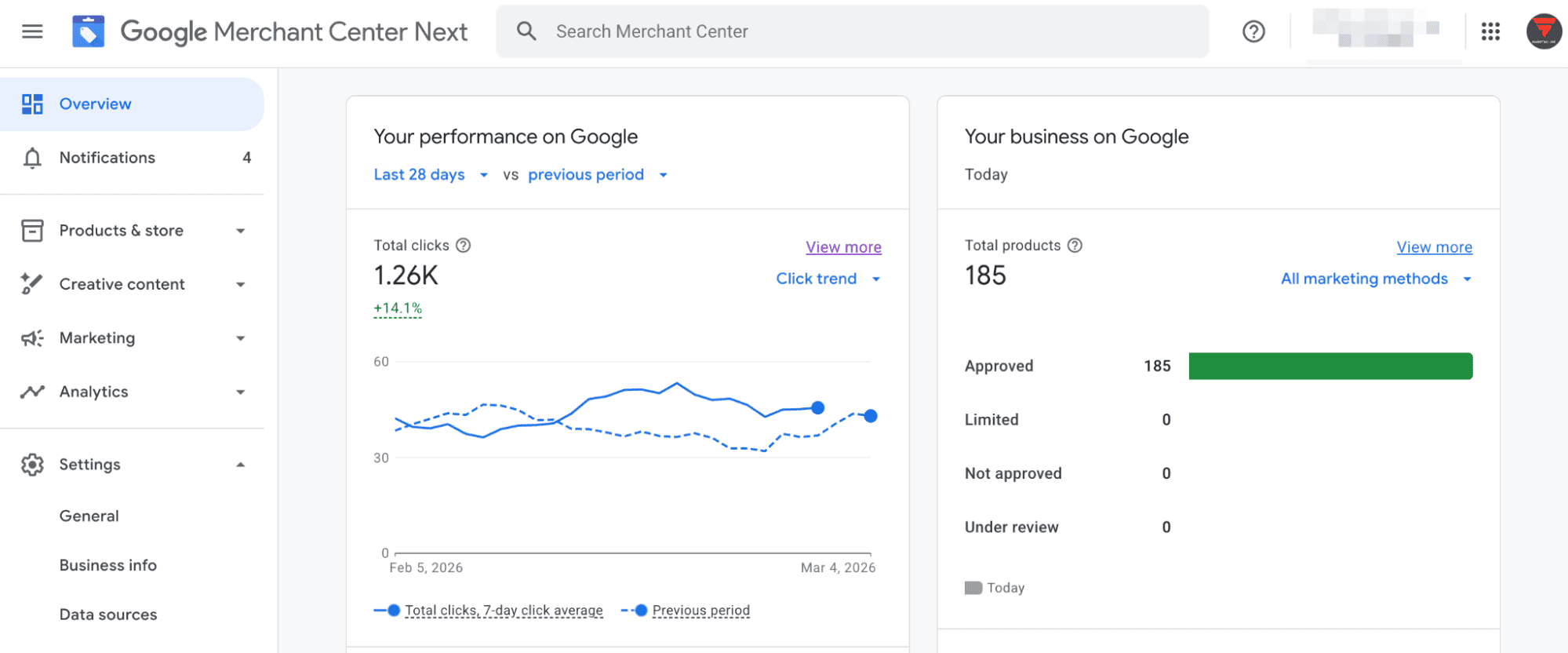
We uploaded products to Merchant Center and immediately noticed that the product feed provided by the client was in CSV format, meaning the data would not update automatically. In addition, the feed lacked the required attributes to pass moderation. Since the client did not have a developer available at that time to fix these issues, we decided to use an automatic feed for advertising.
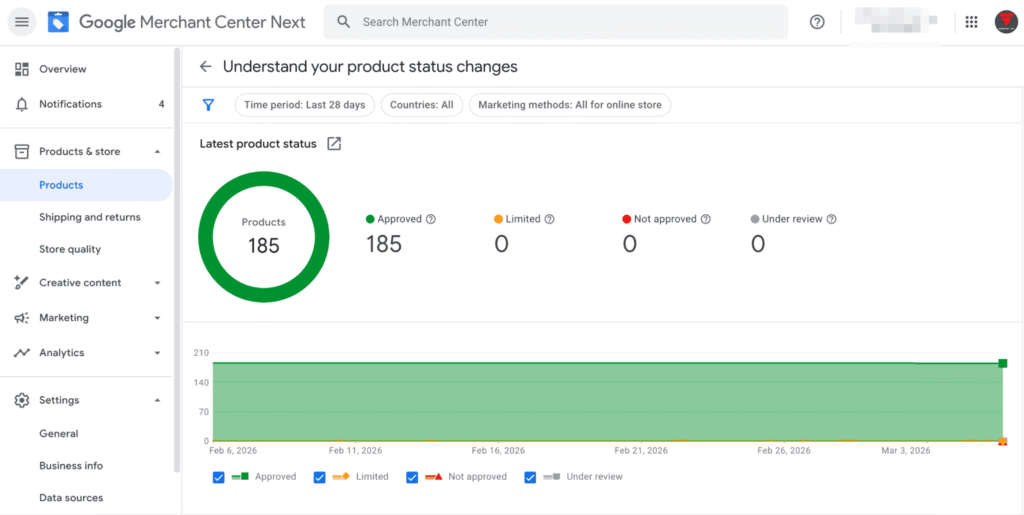
As a result, we achieved 100% product approval and received the green light to launch Shopping and Performance Max campaigns.

Expert Comment
Merchant Center is no longer just an optional feature of Google Ads—it is a must-have for online sales. It expands available settings and enhances them with Performance Max and Shopping campaigns. A potential customer sees the product across multiple ad formats and channels simultaneously. However, none of this works if Merchant Center requirements are ignored. The client experienced this firsthand by effectively rebuilding the website to meet required standards.
We also focused on UX/UI—no matter how professionally advertising is set up, if it leads to a неудобный website, strong results should not be expected. The formula of Merchant Center combined with a high CRO (conversion rate optimization) website is what adds a “rocket engine” to your sales—just make sure to invest enough time in setup and ongoing maintenance.
Google Ads Work
- Created a Google Ads account.
- Set up analytics.
- Conducted a website audit.
- Provided recommendations to improve product visibility in Google Shopping.
- Created a Google Merchant Center Next account.
- Launched a branded search campaign.
- Started remarketing in the Google Display Network (GDN).
- Set up separate search campaigns using the SKAG strategy to reduce CPC.
- Launched one Shopping campaign and one Performance Max campaign due to the client’s limited budget.
- Set up Dynamic Remarketing in GDN.
- Added separate keywords for the most popular queries (models) to the branded campaign with corresponding URLs.
- Additionally configured events to improve campaign optimization.
We also perform the following ongoing monthly optimization tasks:
- Search term analysis (adding irrelevant queries as negative keywords and identifying new high-performing keywords).
- Implementing Google recommendations (accepting relevant ones and rejecting ineffective ones).
- Budget reallocation to higher-performing campaigns.
- Adjusting bidding strategies across campaigns.
- Analyzing segment performance in Shopping and Performance Max campaigns.
- Working with CPA (increasing bids for keywords with strong CPA performance and decreasing bids for keywords/ad groups/campaigns with no conversions over the past month or with CPA at least 50% worse than the account average).
- Optimizing placements in GDN.
- Location bid adjustments based on CPA performance.
- Identifying new scaling opportunities for advertising campaigns.
Challenges
ROAS Drop
Three months after launching the Performance Max campaign, ROAS dropped sharply in the ad account. After a thorough review, we found that 50% of products in Merchant Center were disapproved due to the issue “Missing value [price].” Since we were using an automatic feed in advertising, half of the products were rejected. We quickly identified the issue and improved the product integration via API.
Incorrect Conversion Tracking
During the project, conversion tracking was disrupted several times—phone click tracking and Purchase events—due to changes made by the client on the website. We promptly identified these issues and fixed them immediately. It is critical to resolve such problems quickly so campaigns can continue learning properly and we can draw accurate conclusions about their performance.
Results
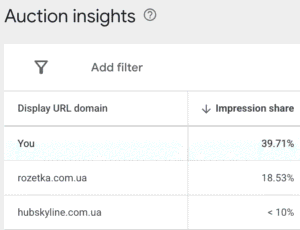
Despite challenging external factors, the account showed the following performance in February 2026:
- ROAS—685%;
- Transactions—58:

- Impressions—39.71%;
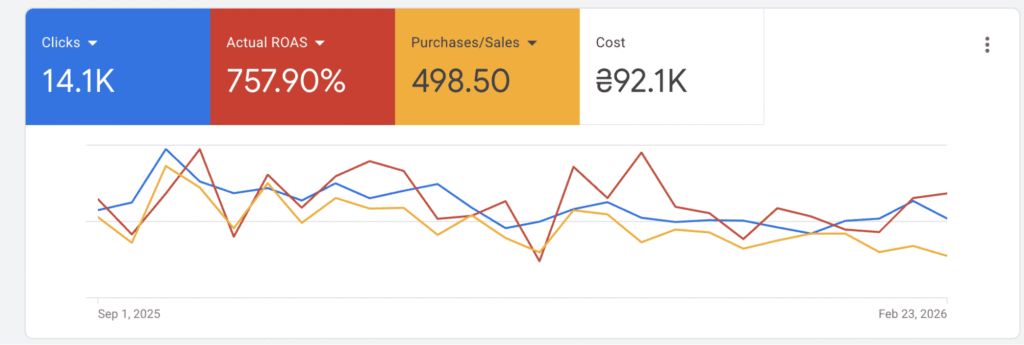
Over the past six months, the account achieved an average monthly ROAS of 758% and 499 transactions:
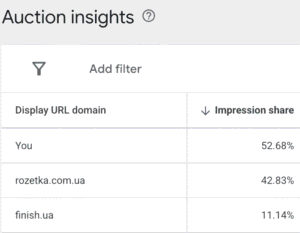
- Impressions—52.68%;
Recent average performance compared to the first months of cooperation:
- average monthly traffic increased from 777 to 2,350—up 202% (while the budget increased by only +169%);
- average ROAS increased from 184% to 757%;
- average number of transactions grew from 7 to 83—up 1,085%.

Expert Comment
For this client, as with most B2B businesses, the most effective solution was the combination of Performance Max and standard search campaigns within a single ad account. Performance Max provided scale and reach through its multi-placement format and broad audience coverage, while search campaigns ensured full control over traffic: keywords, search queries, structure, and bids. For B2B, this combination is a fundamental requirement for effective campaign management.
A key element of account management was deep optimization of Performance Max as the primary sales driver. A significant portion of time was dedicated to analyzing and adjusting the campaign based on the performance of individual products and categories: we excluded or limited underperforming products and shifted focus to high-potential segments. At the same time, we tested audience signals, monitored search terms—filtering out irrelevant, informational, and competitor traffic—and continuously reviewed placements to avoid low-quality impressions across the Display Network, YouTube, and mobile apps.
Conclusions
When building a marketing strategy for eCommerce, Performance Max and Shopping campaigns play a key role. They are the main drivers of sales growth and scaling.
Shopping campaigns drive a stable flow of high-intent traffic by showcasing the product directly—price, image, and title—both in Google Search and Shopping results.
Performance Max allows you to confidently scale results, attract new audiences, and cover key Google placements. At the same time, it works effectively with remarketing and increases overall value.
Together, these campaign types significantly increase revenue, strengthen brand presence in Google Search and Shopping results.
Regular and systematic optimization is equally important. By continuously working with search terms in Performance Max, you avoid wasted spend, while optimizing audience signals improves traffic quality.
Branded search campaigns capture the highest-intent audience at the lowest cost per conversion—helping maintain top positions in search results and preventing competitors from capturing branded traffic.
Order an individual consultation for your business
-
Tags
